Out of the box, Traefik has a simple basic auth middleware that can be used for proxied apps that don't have their own authentication solution.
If you followed my Traefik configuration guide, you would already be using Traefik's basic authentication solution. In this guide, we'll be replacing this middleware with FowardAuth.
Why not BasicAuth?
BasicAuth is a quick and easy solution to secure a service you're not exposing publicly. However, its lack of MFA and having to enter a username and password when switching between services was enough to make the switch. It also gives me an opportunity to learn something new, which is always welcome.
FowardAuth
FowardAuth is Traefik's built-in solution for forwarding Authentication to an external auth service. OAuth & OIDC services are supported. Previously, I had set this up with Google SSO using Google's Cloud API. In this guide, we'll be configuring SSO using Azure Active Directory.
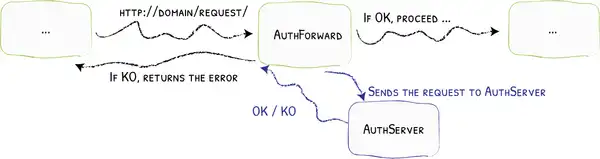
We will supplement the ForwardAuth middleware with thomseddon's Forward Auth docker image. This will be our dedicated endpoint for all authentication requests.
Add a DNS entry
From your DNS provider, add a new entry for your auth endpoint. I suggest using something like 'auth.subdomain.example.com' or 'aad.subdomain.example.com'.
Here's the entry I've added in Cloudflare:

Nyx is the subdomain configured with the SANS certificate in my Traefik guide
Create the Azure App
From the Azure Portal, navigate to the App Registrations blade and click New Registration.
Give it a relevant name and add a web redirect URI with your newly created subdomain E.g https://[serviceUrl]/_oauth. Click Register.
TIP
The Azure interface only lets you add one redirect when creating a new registration. Additional URIs can be added from the Authentication tab after creation.
It's important to add the URL for each of the services you want to protect with SSO.
Under Certificates & Secrets, generate a new secret for the application. Make sure to copy it and keep it somewhere safe. Secrets will only appear once.
Create the Auth Container
Next, we're going to create our Auth container using thomseddon's Forward Auth docker image. In my config, I've tacked this onto my Traefik docker-compose file:
auth:
    container_name: auth
    image: thomseddon/traefik-forward-auth:latest
    depends_on:
      - traefik
    networks:
      - traefik
    environment:
      - DEFAULT_PROVIDER=oidc
      - PROVIDERS_OIDC_ISSUER_URL=https://sts.windows.net/[tenantID]/
      - PROVIDERS_OIDC_CLIENT_ID=[clientID]
      - PROVIDERS_OIDC_CLIENT_SECRET=[clientSecret]
      - COOKIE_DOMAIN=[yourDomain]
      - LOG_LEVEL=debug
    labels:
      - "traefik.enable=true"
      - "traefik.http.routers.auth.entrypoints=http"
      - "traefik.http.routers.auth.rule=Host(`aad.[subdomain.example.com]`)"
      - "traefik.http.middlewares.auth-https-redirect.redirectscheme.scheme=https"
      - "traefik.http.routers.auth.middlewares=auth-https-redirect"
      - "traefik.http.routers.auth-secure.entrypoints=https"
      - "traefik.http.routers.auth-secure.rule=Host(`aad.[subdomain.example.com]`)"
      - "traefik.http.routers.auth-secure.tls=true"
      - "traefik.http.routers.auth-secure.service=auth"
      - "traefik.http.services.auth.loadbalancer.server.port=4181"
      - "traefik.docker.network=traefik"
    restart: unless-stopped
networks:
  traefik:
    external: true
Make sure to check all environment variables and labels to ensure you've removed ALL placeholders.
Create/Update the Auth Middleware
In the Traefik config file, add or update your auth Middleware to the following:
http:
  middlewares:
    auth:
      forwardAuth:
        address: "http://auth:4181"
        trustForwardHeader: true
        authResponseHeaders:
          - "X-Forwarded-User"
Add the Auth Middleware to Your App
To require AAD authentication on a container or service, just update your middleware label to include 'auth@file'. Here's an example:
- "traefik.http.routers.traefik-secure.middlewares=ipWhiteList@file, auth@file"NOTE
IMPORTANT: Make sure you include each service in your App Registrations Redirect URI list. The list should include all hosts you intend to authenticate from.
If you see the message below, the URL you're trying to access is not in the App Registrations URIs:
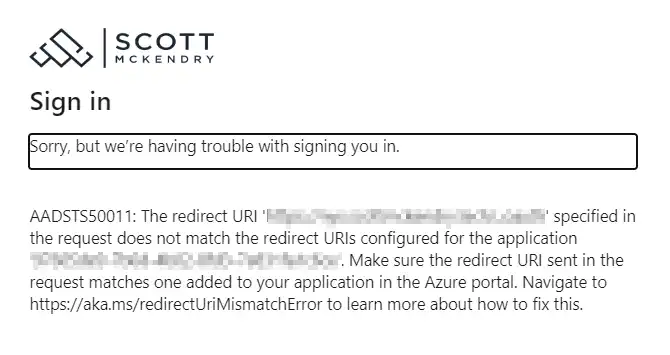
Also check that the URI is in https://[serviceUrl]/_oauth format
Test Your Apps
Now if you go to one of the hosts you've configured for auth, you will be swiftly redirected to your organisation's login page:
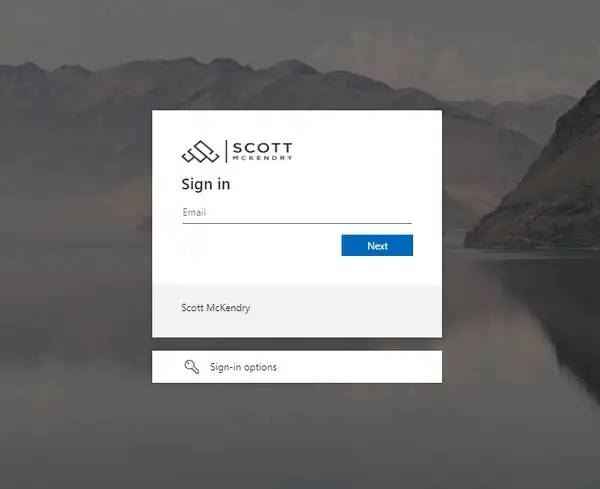
Because we've configured a persistent cookie across our domain, you'll only need to sign in once. Pretty neat!
Troubleshooting
As with any undertaking like this one, you're more than likely to run into some problems along the way. Both Traefik and thomseddon's forward auth containers have great logging, which was invaluable when configuring the solution.
Logs can be viewed from your docker host server using:
docker logs authand:
docker logs traefikwith 'auth' and 'traefik' being the names of the respective containers. There is also plenty of helpful documentation on the GitHub repo: